Payment requests allow grant recipients to invoice grant funding organizations for expenses accrued (reimbursement) or anticipated (cash advance) during the life of the grant. For clients with funders in AmpliFund, payment requests can be submitted directly to the funder for review and approval.
Prerequisite: Payment request cannot be submitted to a funder in AmpliFund
- Open Grant Management>Grants>All Grants.
- Click a grant name.
- Open the Post-Award tab>Cash Flow>Payment Requests.
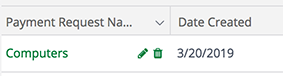
- Click the (Edit icon) in the next to a payment request name.
- Update the information as necessary.
- Click Save.
Comments
1 comment
Thank you and I do understand. At this point, can I change the invoice name? Please advise.
Ditas Mesina Vidad
GRANT ADMINISTRATOR
VILLAGE OF BOLINGBROOK | 375 W. Briarcliff Rd. | Bolingbrook, IL 60440
Email: mvidad@bolingbrook.gov | Phone: 630-226-8423
Please sign in to leave a comment.